MDV
Module used to integrate with a MDV AC unit. The iZone AC unit module (C325#) connects to the CPU module (C225) to enable communication with a ducted AC unit.
V6-i Series VRF
Compatibility
| Series | Indoor | Outdoor | AC Unit module |
|---|---|---|---|
| MVi-28.5 kW | MVi-280WV2RN1(A) | C325MD |
note
If your unit's model number is not listed above, contact supportdesk@izone.com.au to confirm compatibility.
Connection
CN9 Indoor Connection
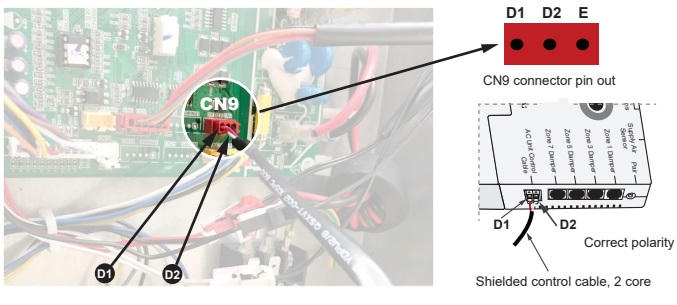
Notes
Resetting the indoor unit addressing is mandatory before connecting the iZone controller for 20kW+ units.
Resetting the Unit Addressing on MDV 20Kw+ units
After a test run with the MDV AC unit controller, please reset the unit address before installing iZone control system.
- Power Down the System
- Turn off the power to both the indoor and outdoor units.
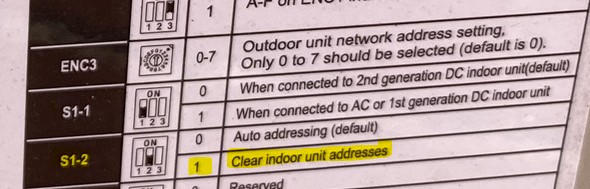
- Clear Indoor Unit Addresses
- On the outdoor unit control board, locate the S1 DIP switch.
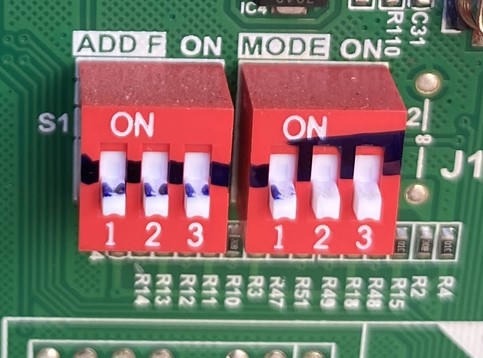
- Move DIP switch 2 on S1 to the ON position to clear the indoor unit addressing.
- Power Cycle the Units
- Wait 5 minutes.
- Turn the power back on to both the indoor and outdoor units.
- Wait another 5 minutes, then turn both units off again.
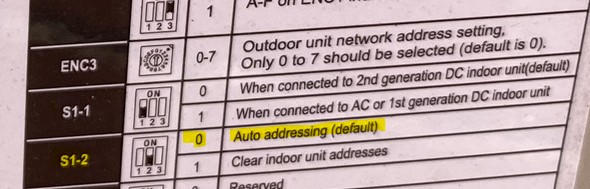
- Return to Automatic Addressing
- On the oudoor unit control board, locate the same S1 DIP switch
- Move DIP switch 2 on S1 to the OPPOSITE position (the position opposite of ON).
- Reconnect the iZone system to the indoor unit.
- Restore Power
- Turn the power back on to both indoor and outdoor units and wait 5 minutes.
- You can now operate the AC system through iZone.
Firmware and Updates
C325MD
- No firmware.