Nova DC wall controller
Part number: CCASLW
Overview
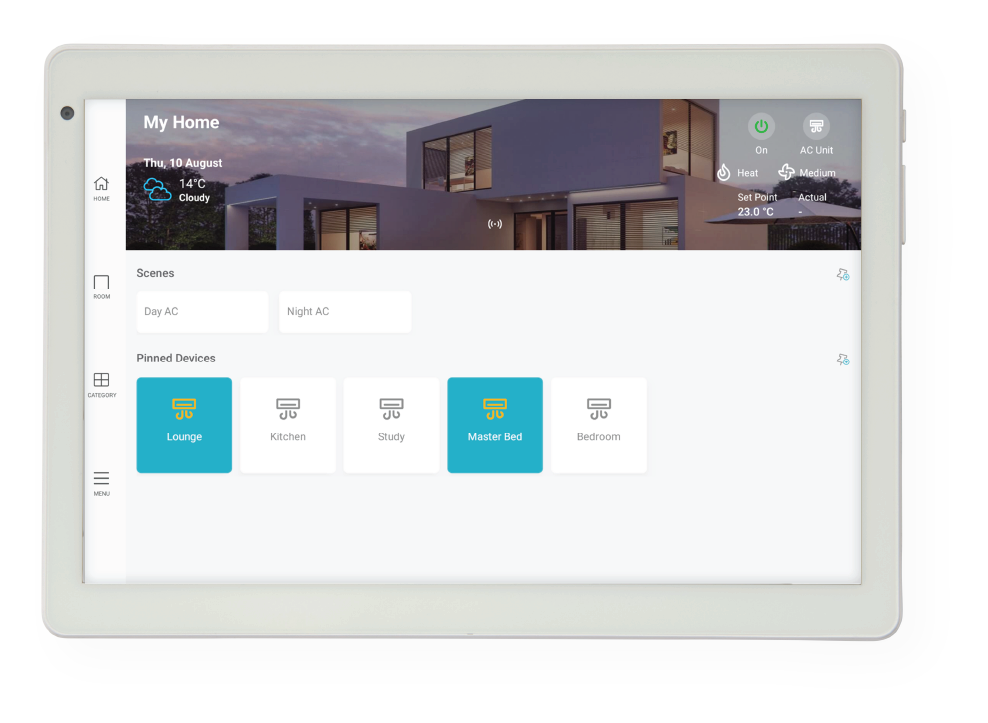
The Nova wall controller is the 10″ touch screen with a DC power connection. The touch screen provides a user interface where a user can communicate with the zone control system. The wall controller is powered by a DC transformer and communicates with the Smart Hub (COCBH) via a Wi-Fi connection. The 10" wall controller forms part of the Nova Zone Control Kit (C545K).
Installation Guides
Mount the Nova 10″ wall controller backplate to the wall using the supplied screws. Route the DC power cable from a GPO in the roof space through the backplate opening and connect the DC plug to the socket on the rear of the Nova screen. Once connected, align the screen with the backplate and gently press until all four retaining clips engage securely.
Refer to the Nova DC zone controller kit for a detailed installation guide of the full zone control kit.
User Guides
Troubleshooting
- No Comms on Wall Controller/App
- Nova wall controller screen is blank or unresponsive
- Actual temperature reading dissapears
- Zones not responding correctly or damper fault
Specifications
| Specification | Description |
|---|---|
| Power supply | 12VDC (1.5A) with 2.1mm DC power connector |
| Communications | WiFi 802.11 |
| Connectivity | WiFi 802.11 |
| Built in sensor | No temperature / air quality / humidity sensor |
| Screen | 10" colour capacitive touch screen |
| Resolution | 1920 x 1200 pixels |
| Operating system | Android |
| Dimensions | 165H x 240W x 25L mm |
| Weight | 455g |
Firmware and Updates
Version 1.25 - Sep 2026
- iZone Home 3.2.0
- Set the system’s initial default clock to 01/01/2000.
- Improved Neomate time resynchronisation.
- Added diagnostic error parameters for wired communication to detect CSL hardware failures.
Version 1.24 - Aug 2026
- Fix Google account login spinning issue for 1.23 FW.
Version 1.23 - Jul 2026
- iZone Home 3.1.9
- Disable requests to app when in the middle of the Screen Link Module (CSL) software update (OTA).
- Keep screen active while OTA in progress for Screen Link Module (CSL).
- Show error details when time is incorrect or no internet when OTA fails.
- Improve wired communication reliability using a ring buffer.
Version 1.22 - Jun 2026
- iZone Home 3.1.8
- Improve automatic timezone updates
- Improve wired communication reliability using a ring buffer.
- Store the first installers details to wall controller persistant memory.
- Able to switch wired communication to debug mode.
- Show wired communication in diagnostics function.
Version 1.21 - Feb 2026
Version 1.20 - Dec 2025
- iZone Home 3.1.5
- Real-Time, Responsive Control: The app provides real-time, responsive control of the air conditioning system and zones, with immediate feedback and no loading delays. Aircon tiles and buttons now update their status instantly when operating on local Wi-Fi.
- If an operation fails, the system will automatically roll back the action.
Version 1.19 - Dec 2025
- iZone Home 3.1.4
- Disable battery management function within operating system.
Version 1.18 - Nov 2025
- iZone Home 3.1.4
- Fix wired Nova USB drop off issue
- Fix remote support when entering installer code from Zonewatch
- Resync time if heartbeat report time differs more than 10s from server time
Version 1.17 - Nov 2025
- iZone Home 3.1.3
- Pair COCB from Wired Nova: COCB modules can now be paired directly through a wired Nova controller, simplifying installation and setup.
- Cross-Controller Global-Scene Deletion: Nova wall controllers can now delete global scenes created by other Nova controllers, allowing full shared scene management.
- “Pin All Devices” Support for Nova Configuration: Nova users can now pin all available devices at once when creating a new tile for faster setup.
- Batch Improvements & Minor Fixes: General stability refinements and UI corrections applied across Nova interactions.
Version 1.16 - July 2025
- iZone Home 3.1.2
- Support AC Auto-On with Zone Changes: Whenever any zone is switched to “Open” or “Climate,” the AC unit now powers on automatically.
- Hide Zone Open Controls Option: You can disable the “Open” button and airflow sliders on zones equipped with temperature sensors (when no sensor faults exist).
- Enhanced Lockout Visibility: Lockout status and details are now prominently shown whenever the system enters lockout.
- OTA Updates for COCB & C225: Firmware for both COCB and C225 modules can now be upgraded over the air.
- Custom Nova Wall-Controller Naming: Homeowners may assign their own names to each Nova wall controller.
- 7-Day Recipe & Global-Scene Log in Notifications: The Notifications panel now displays the last seven days of recipe and global-scene activations.
Version 1.15 - May 2025
- iZone Home 3.1.1
- Added support for standalone temperature and humidity sensors to expand environmental monitoring capabilities within iZone systems.
- Nova now automatically pins or unpins zones on the homepage when the number of zones is changed, ensuring a dynamic and responsive user interface.
- Introduced a new system settings list accessible via the Nova wall controller and installer account, streamlining access to key configuration options.
- Enabled support for hidden systems in the Nova wall controller to allow customized visibility of installed systems.
- Added the ability to skip the setup wizard on the Nova wall controller for faster system initialization.
Version 1.14 - Apr 2025
- iZone Home 3.1.0
- Improved responsiveness of Nova when displaying constant zones, ensuring real-time status updates are reflected accurately.
- Enhanced synchronization between Nova and the mobile app for active constant zone indicators.
- Optimized backend communication between Nova and cloud services to reduce sync delays and improve overall system stability.
- Fixed inconsistencies in how pinned global scenes were handled by Nova when reordered via location settings.
- Updated Nova's internal architecture to align with the new mobile app framework for future compatibility.
- Improved internal error handling and logging within Nova to assist with diagnostics and support.
- Backend support added for upcoming Nova feature expansions, including dashboard and performance insights.