Smart home landscape
Smart Hub network
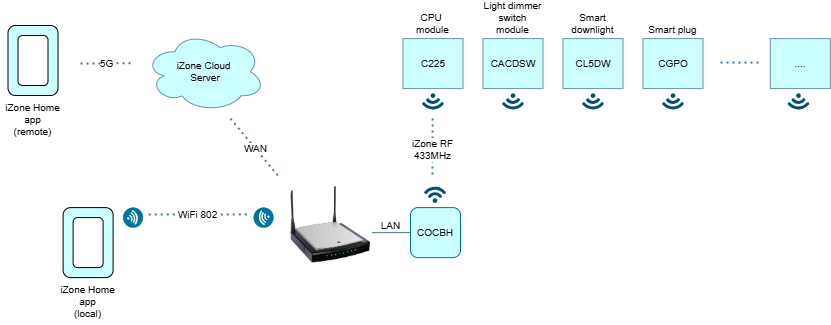
The Smart Hub (COCBH) is the central gateway of the iZone system, linking the outside world to the home by connecting to the router over the WAN and translating cloud or app commands into local 433 MHz RF signals that control devices such as CPU Module (C225), Light Dimmer Switch Modules (CACDSW), Smart Downlights (CL5DW), Smart Plugs (CGPO), and other iZone modules; it maintains secure communication with the iZone Cloud Server for remote access via 5G or Wi‑Fi, synchronises system status across all devices and coordinates all messaging so the entire automation network functions reliably and in real time.
Benefit of the Smart Hub
The Smart Hub (COCBH) becomes the single point of intelligence, coordination and connectivity for everything in the home. By centralising control, it delivers smoother automation, faster communication and a far more reliable user experience. It also unlocks remote access through the cloud, keeps all devices synchronised, reduces Wi‑Fi congestion by shifting local traffic to RF, simplifies integrations with platforms like Alexa or Google Home and makes the whole system easier to expand because every new device only needs to pair with the hub rather than the entire network.
Hardwire Connection with CPU Module
If the RF link between the Smart Hub (COCBH) and a CPU Module (C225) isn’t stable, too weak, or the distance is simply too great, you can bypass the wireless path entirely by using a hard‑wired connection. In this setup, the hub connects directly to the CPU module over a Bridge cable (CGB2C35), ensuring a guaranteed, interference‑free link. This is especially useful in homes with thick walls, metal framing, long distances, or environments with heavy RF noise. Hardwiring removes all the variables that can affect 433 MHz RF performance, giving you a rock‑solid connection for critical control functions while still allowing the rest of the system to operate normally over RF.

Connecting Smart Hub to Wi‑Fi
You can also connect the Smart Hub (COCBH) to the home network wirelessly via Wi‑Fi when it’s not practical to move the hub closer to the router or CPU Module (C225). This gives you flexibility in difficult installations, especially when the hub needs to be positioned near RF devices for better signal strength. However, a wired LAN connection is always the preferred option because it provides the most stable, interference‑free link between the hub and the network. Wi‑Fi is acceptable as a fallback, but LAN ensures the fastest communication, fewer dropouts and the most reliable overall system performance.
