Wireless temperature sensor
Part number: CRFSW
Overview
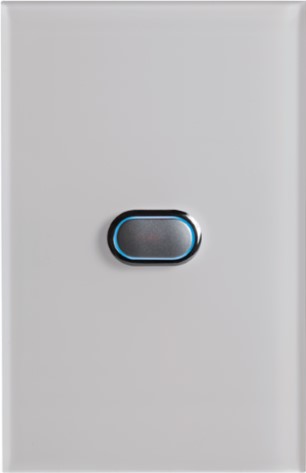
The CRFSW is a wireless temperature sensor for zone based climate control. Mounted on the wall in each zone, it measures room temperature and allows the zone to be turned on or off by pressing the button. Temperature readings are transmitted to the CPU Module (C225) via 433 MHz radio frequency every 60 seconds, ensuring accurate and responsive climate management. Available in white (CRFSW), black (CRFSB) and ocean mist (CRFSO). A wired version of this sensor is also available called a Wired Temperature Sensor (CSW).
Installation Guides
Sensor placement within the home
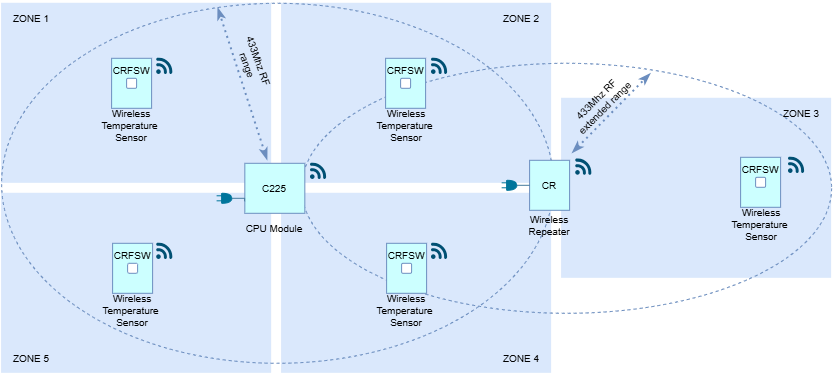
Wireless temperature sensors transmit temperature readings to the CPU Module (C225) via 433 MHz radio frequency every 60 seconds. As with all wireless devices, the effective communication range can be affected by the installation environment. When selecting a sensor location, consider potential sources of electromagnetic interference, such as electrical wiring, battery inverters, switchboards and other electronic equipment. Avoid installing sensors inside metal enclosures or closed metal cupboards, as these can create a Faraday cage effect and significantly reduce signal strength.
In ideal conditions, sensors can transmit up to 70m line-of-sight. Within a typical home, the effective range is generally between 10m and 20m, which is suitable for most installations. If greater coverage is required, the signal range can be extended using a Wireless Repeater (CR).
Sensor placement within the zone
Choose a location that accurately represents the average temperature of the room. Avoid installing the sensor:
- Directly underneath an air outlet or vent
- In direct sunlight
- Near heat-generating appliances
- On external walls exposed to temperature extremes
- Directly above a wall switch, as electrical cabling within the wall may interfere with wireless communication
For best results, install the sensor on an internal wall within the room's natural airflow path. A common and convenient location is near the room entrance, alongside a wall switch at approximately waist height.
Pair sensors
Multiple zone sensors (Zone control)
This option involves installing a sensor in each room or zone. Read more about Zone control.
Single sensor (RF sensor control)
This option involves installing a single sensor for the entire home that is essentially paired to an AC Unit. Read more about RF Sensor control.
User Guides
When a user presses the button on the sensor.
| DIP switch dial setting | LED Flashes |
|---|---|
| 1-14 (Zone control) | BLUE: Climate control ON RED: Climate control OFF BLUE & RED: Communication error |
| R (RF sensor control) | BLUE: AC turns ON RED: AC turns OFF BLUE & RED: Communication error |
Troubleshooting
Specifications
| Specification | Description |
|---|---|
| Power | CR2032 battery |
| Battery life | Approx 1-2 years |
| Operating temperature | -14⁰C to 65⁰C |
| Communications | 433Mhz RF |
| Range | Free field approximately 70 meters (In a building the range will vary depending on the wall, roof and furniture materials which the radio signals needs to pass through) |
| Dimensions | 18H x 72W x 116L mm |
| Weight | 92g |
Firmware and Updates
CRFSW 1.8 - Jan 2026
- Fixed iZone/VRF pairing stability
- Improved production testing reliability
- Updated VRF zone pairing requirement (Zone Select Switch position 15)
CRFSW 1.7 - May 2025
- Change default RF channel to fix production testing issue
CRFSW 1.6 - Dec 2024
- Added support for VRF
CRFSW 1.5 - Feb 2024
- Add option to send temperature for unit control (“RF Sensor”)