NET Multiplexer
Part number: CISM
Overview
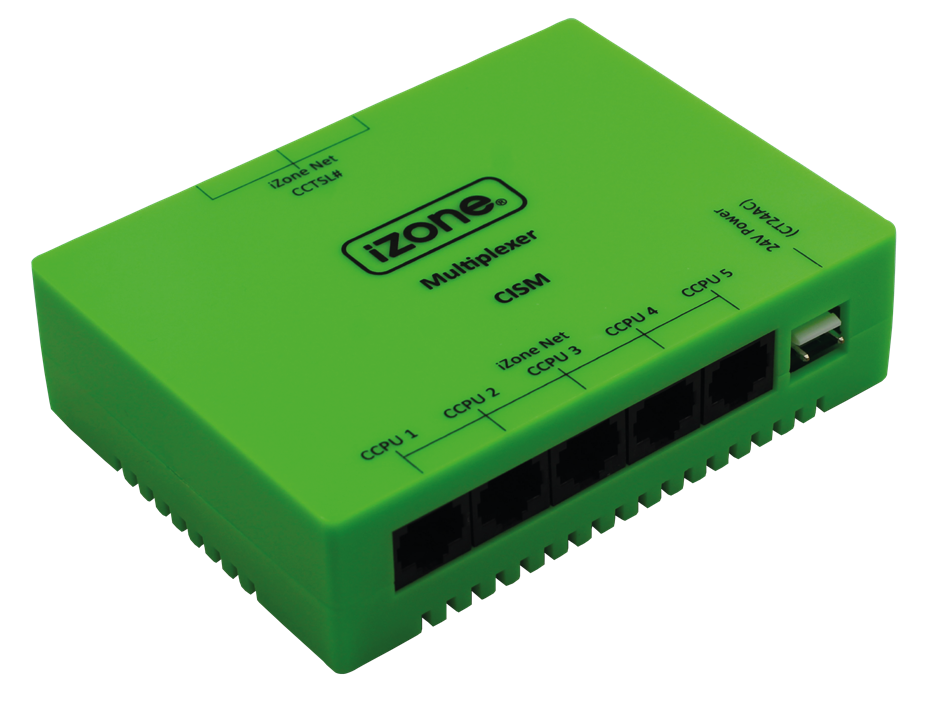
The NET Multiplexer is used to display and control up to five (5) AC systems on a single Nexus Touch Screen (CCTSLW+). It also supports connecting up to three Nexus Touch Screens to a single Multiplexer. The NET Multiplexer forms part of a NET Multiplexer Kit (CISMK) that is made up of a CISM + 1m CAT5 cable (CFC1s).
Installation Guides
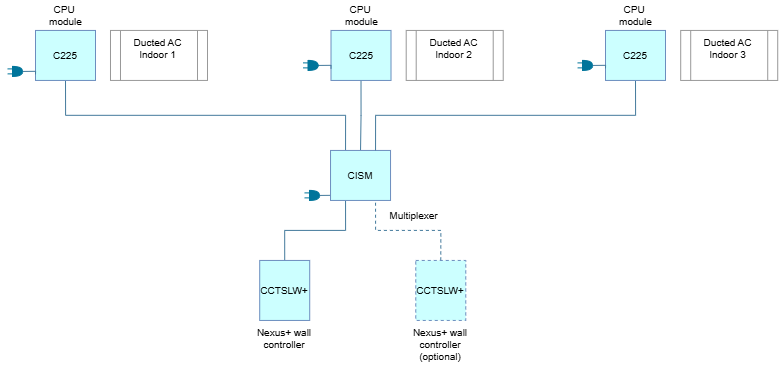
Each ducted AC unit is connected to its own CPU Module (C225). The CPU Modules (C225) are then all wired back to a central NET Mutiplexer (CISM) that manages communication between the multiple AC units and the user control interface. The Multiplexer connects to a Nexus+ wall controller (CCTSLW+), allowing a single touchscreen to control and monitor connected systems. The Multiplexer can display up to 5 indoor AC units and a maximum of 3 Nexus wall controllers can be connected. Each Multiplexer is powered seperately with a 24VAC power supply (CT24ACE).
- Ensure all components have the same firmware version across all iZone systems. If the versions are different, use the highest version on CPU 1
- Install each system as a stand-alone system first. This includes all items that need to be paired to each individual system. This includes the Smart Hub, do not pair the hub when the multiplexer is attached, it will only pair to the first system in CPU 1
- Once each system is operating correctly as a stand-alone unit: You can now begin to install the multiplexer
- The multiplexer is labelled: CPU 1 / CPU 2 / CPU 3 / CPU 4 / CPU 5
- The screen will display all connected units: In the order that you plug them in, starting at CPU 1
- The screens have three iZone net ports on the multiplexer to plug into: You can use any port, in any order
- Once all systems and screens have been plugged into the multiplexer: You should hit the reset button on one of the screens and allow the iZone to fully load through the initialisation phase
- See Video for a visual overview.
User Guides
- Each system will apear as a seperate row of buttons on the Nexus screen. The rows are displayed in the order of connected CPU modules.
- Screens connected to a Multiplexer cannot be used as zone or master temperature control sensors
- If one Nexus screen is connected to the multiplexer the air quality measured by the Nexus screen will be displayed on all other screens connected to the same multiplexer
- If the Nexus screen is directly attach with your multiplexer, then you cannot use this screen as a temperature sensor.
Troubleshooting
No known issues.
Specifications
| Specification | Description |
|---|---|
| Power supply | 24VAC 50Hz |
| Communications | CAN Bus / iZone NET |
| Number of systems | 2-5 |
| Number of Nexus screens | 2-3 |
| Dimensions | 32H x 120W x 90L mm |
| Weight | 151g |
Firmware and Updates
CISM 1.4 - Nov 2019
- Fixed an issue with random system disappearing from the screen