Ventilation systems
iSave
The iSave system cools your whole home using your ducted reverse cycle air conditioner’s fan mode. The iSave system enhances your ducted reverse cycle air conditioner by efficiently utilizing its fan mode to cool your entire home. It works by drawing fresh air from outside, filtering it, and circulating it throughout your living spaces, while expelling hot air through your roof space or open windows. This creates a cooling effect similar to an evaporative air conditioner-without the need for a bulky rooftop unit or water.
Using the iSave system can significantly reduce your air conditioning costs, as it operates at just a few cents per hour. The more you use it instead of your conventional ducted reverse cycle air conditioner, the greater your savings. Additionally, it helps your primary air conditioner run more efficiently by preventing heat buildup, reducing its workload and operational expenses.
The system also improves indoor air quality by filtering incoming air. It can be installed with both new and existing ducted reverse cycle air conditioners, provided there is sufficient roof space for the extra ductwork and components. Overall, the iSave system offers a practical and cost-effective way to boost your home’s cooling efficiency while lowering energy consumption.
Please note this feature is available for Western Australian users only at the moment. If you are in Eastern States and would like to know about the possibility of installing iSave with your iZone system on your reverse cycle ducted unit (if compatible), please contact salesdesk@izone.com.au for further information and guidance.
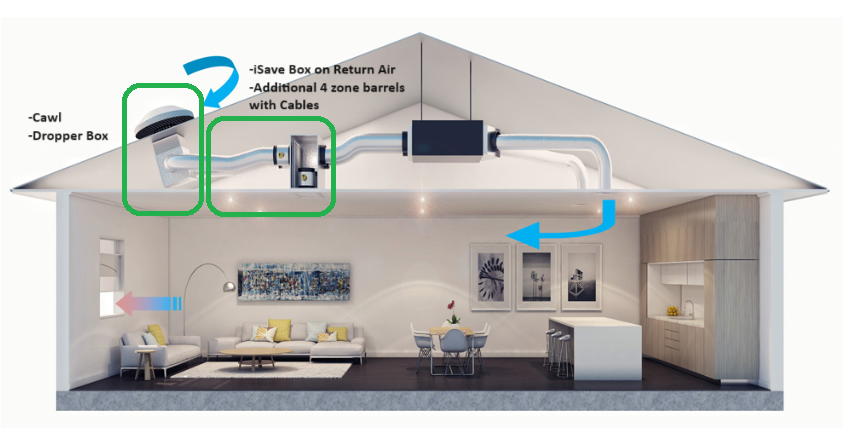
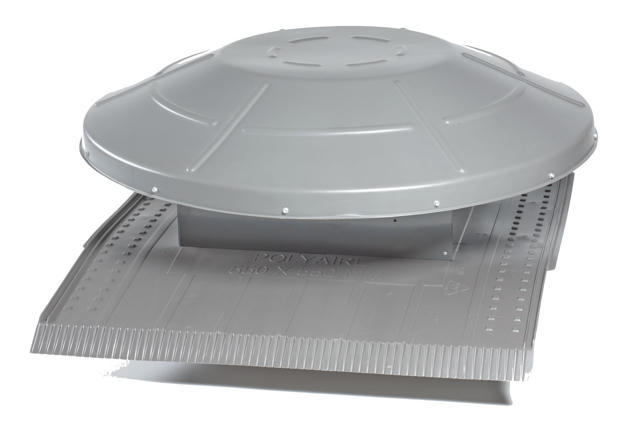
Only the air entry point is visible outside.
Automate ventilation units
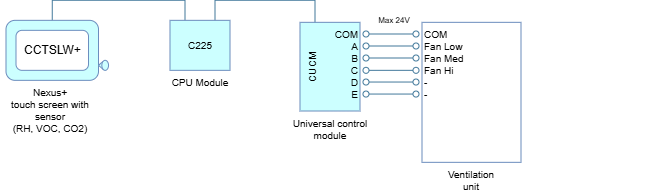
Ventilation can be fully automated using the built-in sensors of the Nexus+ Touch Screen (CCTSLW+). By connecting a Universal Module (CUCM) to a ventilation unit and installing a Nexus+ touch screen, the system can measure relative humidity (RH), carbon dioxide (CO₂), and airborne contaminants such as odours and fumes (VOCs). The system then automatically adjusts airflow based on demand, ensuring fresh and healthy indoor air, improving energy efficiency and helping to prevent humidity related issues.
Wiring diagram
Configuration
On a Nexus+ wall controllers (CCTSLW+):
- Select Settings -> Configuration -> Configure Air Conditioner -> AC UNIT -> AC settings -> Universal Unit Control -> ✎ Edit pencil
- Press down arrow and select Ventilation from the list
- Press down arrow again and select which parameter(s) to change the setpoint.
- RHI setpoint:
50% - VOCs setpoint:
100ppb - CO2 setpoint:
700ppm - Fan stage delay:
20 minutes[minimum time delay between fan speed changes] - Use RH control:
Y/N - Use VOCs control:
Y/N - Use C02 control:
Y/N - Cycle fan off:
Y/N[cycle off or continue to run at low speed when all parameters are less than their respective setpoints]
- RHI setpoint:
User control
On a Nexus+ wall controllers (CCTSLW+):
| Power | Mode | Fan speed |
|---|---|---|
| On/Off | Low / Medium / High / Auto |