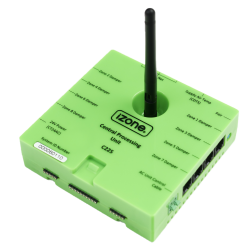
8-zone CPU module
Part number: C225
Overview
The CPU Module (C225) is the main processing unit for iZone climate control systems. It handles zone control logic, communicates with AC unit interface modules (C325#), wall controllers, wireless sensors and the Smart Hub. Supports up to 8 zones natively, expandable to 14 with a Zone Extender Module (CEXT).
Installation Guides
Install the C225 close to the ducted AC indoor unit, usually on top of the fan coil unit. Make sure the antenna is tight and pointing vertically upwards.
- Nova CAT5 zone control kit
- Nova DC zone control kit
- Nexus zone control kit
- Naked 8-zone control kit
- Nano zone control kit
- Zone motor compatibility
User Guides
Troubleshooting
- No Comms on Wall Controller/App
- Smart Hub not powering on, offline, or CPU Not Detected
- Zones not responding correctly or damper fault
Specifications
| Specification | Description |
|---|---|
| Power supply | 24VAC 50Hz |
| Casing material | Fire retardant ABS plastic |
| Operating temperature | Up to 65⁰C |
| Communications | Wired CAN Bus Wireless 433Mhz (iZone proprietary protocol) |
| Number of zones | 0 to 8 (RJ11/RJ12 connectors) |
| Dimensions | 32H x 121W x 117Lmm Height 124mm with antenna vertical |
| Weight | 200g |
Firmware and Updates
C225 3.82 - Aug 2026
- Enabled support for the full range of ME fault codes
- Fixed the zone group issue
- Added support for the Navi controller
- Added support for MHI louvre control
- Reduced zone damper speed when overheat protection is enabled
- Fixed the negative return-air temperature issue
- Added press-and-hold PAIR button functionality to restore factory defaults
- Added validation to confirm a sensor type is selected for constant zones using climate control
- Allowed zones to remain unchanged when configuring favourites or schedules
C225 3.80 - May 2026
- Fix to Zone Group bug preventing C225 to startup
C225 3.79 - Apr 2026
- Added support for Rinnai/Midea HA/HB connection
C225 3.77 - Jan 2026
- Braemar Dominator integrationp
- Added TCL ducted AC integration (IRD-211)
- Fixed Brivis reset command and quick on/off issue (IRD-854)
- Resolved VRF wired communication issue between C225 and COCB
- Added feature that will turn AC on when activating a zone. Enable setting ‘AC On with Zone’
- Add support for Nova wired controllers with CAT5 connection
- Add ability to change the static pressure of a Daikin system from an iZone wall controller
- Added zone grouping to combine multiple zones under one name, making it easier to manage large areas
- Added fan speed control when the setpoint is reached for better comfort and efficiency - Daikin Only
- Enabled selection and adjustment of static pressure for supported Daikin units - Daikin Only
C225 3.73 - Sep 2025
- Overheat protection (default off): Automatically opens or closes zones when temperatures go outside safe limits.
- Brivis Integration: Seamless integration with Brivis gas ducted heater using C325BV module.
- Favourite Driven Set Point & Power Control
- Store both set point and ON/OFF state in favourites.
- Auto ON when activating any climate/open zone favourite; Auto OFF with a close all favourites.
- Unit auto ON/OFF on Zone Change: New toggle to automatically turn on AC when zones switch from CLIMATE or OPEN.
- VRF Mitsubishi Electric (ME) support: Integrate with ME VRF systems using a VRF host module (CVRFH) module.
- Remote Firmware Upgrade: Implement the ability to upgrade firmware versions remotely without replacing physical hardware (C225 and COCBH only).
- Bug Fixes & Refinements
- Added configurable timer delay before zones revert to schedules after a Brivis event.
- Expanded sensor source options (return air, master, or RF sensor).
C225 3.70 - May 2025
- Applies VRF default settings during updates performed via PK5/PK4
C225 3.69 - Dec 2024
- Added Mitsi Electric 4th fan speed
- Fixed iZone/Midea/York AC comms status in Nova controller
- Added support for Hisense
- Introduced temperature control for the constant zone
- Added VRF (Variable Refrigerant Flow) functionality
C225 3.66 - Jul 2024
- Fix schedule over midnight
- Fix return air reading in Nova when no temperature control is present
- Change time to ‘auto turn off AC system’ from 60s to 3s
- Fix Brivis 6-fan speed in auto mode
- Add ‘add-on cooler’ option to the Brivis system
- Added sleep timer count down
C225 3.65 - Jun 2024
- Hot water system release (IRD-189)
- Brivis system release (IRD-385)
- Forward system reset message before resetting itself
- Send zone 11 setpoint to COCB
- Change structure of AC unit control firmware for the future VRF system
C225 3.64 - Mar 2024
- Hot water system initial update
- Add humidity to zones
- Send damper positions to COCBH
- Only slow down dampers when bypass is used
- Added Haier AC unit control
C225 3.63 - Jul 2023
- Fix AC unit connection bug (CTZ type boards)
- Added Gree AC unit
- Added Haier and MHI to slow damper strategy
C225 3.59 - Jan 2023
- Fixed advanced constant control with fan auto disabled
Hardware Revisions
| Revision | Description |
|---|---|
| Rev A | Initial release with hardware code 1O9 |
| Rev B | Alternative hardware to Rev A - Code 1B4 |
| Rev C | Alternative hardware to Rev A - Code 1C4 |
| Rev D | Allow support for over the air (OTA) updates - Code 1P9 Requires COCBH Rev B hardware or higher to use OTA |