Screen Link Module
Part number: CSL
Overview
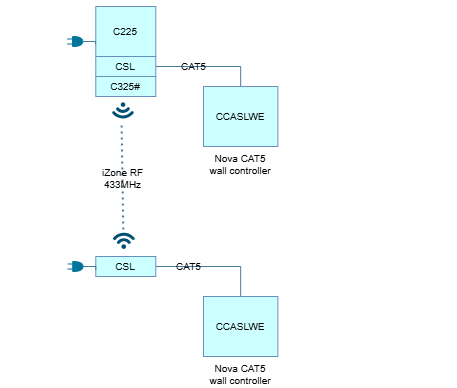
The Screen Link Module (CSL) provides the communication and power interface between a Nova CAT wall controller (CCASLWE) or Nova Mini CAT wall controller (CCASSWE) and the CPU Module (C225) . The CSL communicates with the wall controller via a CAT5 cable and communicates wirelessly with the CPU Module (C225) using a 433MHz RF link. The primary functions of the CSL are:
- Providing power to the wall controller
- Facilitating communication between the wall controller and CPU module
- Enabling additional wall controllers to be added to the system
Installation Guides
Factory paired
The CSL supplied within a Nova kit is factory-paired to the C225 CPU Module. No additional pairing or configuration is required during installation. There is an additional power supply socket available on the CSL module. The 24VAC Power Supply (CT24ACE) can be connected to either the C225 power socket or the CSL power socket, not both. This power supply socket on the CSL is only used when using the CSL as a standalone module.

Add a second Nova wall controller
To add another Nova CAT wall controller (CCASLWE) or Nova Mini CAT wall controller (CCASSWE):

- Power OFF the C225.
- Install an additional CSL into the existing module stack.
- Connect the new wall controller to the CSL using a CAT5 cable.
- Power ON the C225.
- Pair the new CSL:
- Press and hold the Pair button on the CSL until the pair LED illuminates.
- Briefly press the Pair button on the C225.
- The CSL pair LED will turn off.
- Release all pair buttons.
- Wait for the CSL pair LED to illuminate again, indicating successful pairing.
- The new wall controller should display the AC unit controls within a few seconds.

Module stacking
Up to three CSL modules may be connected to a single C225 module and a single 24VAC CPU transformer (CT24ACE).

When a Zone Extender Module (CEXT) is installed, the module order must be C225 → CSL → CEXT → C325#

Standalone CSL installation
The CSL communicates with the C225 via a 433MHz RF link. This allows a CSL to be installed remotely from the CPU module where it is impractical to run a CAT5 cable between locations. A typical application is installing a second Nova wall controller on another floor of the building while the CPU module remains near the indoor unit.
For remote installations:
- A dedicated 24VAC Power Supply (CT24ACE) is required to power the CSL and Nova wall controller.
- The wall controller must remain connected to its CSL using a CAT5 cable.
- Position the remote CSL approximately 10-15m from the C225 for optimal RF performance.
- Avoid locating the CSL near large metal objects, switchboards or other sources of RF interference.
User Guides
After power is applied, the LEDs on the C225 module will begin flashing while the CSL pair LED remains off. After approximately 1-2 minutes, the CSL pair LED will turn on, indicating that the CSL has successfully established communication with the C225 module. If the CSL pair LED does not illuminate after several minutes, refer to the Troubleshooting section to verify pairing, power and RF communication between the modules.
Troubleshooting
Specifications
| Specifiation | Description |
|---|---|
| Dimensions | 119W x 78H x 33D mm |
| Weight | 98g |
Firmware and Updates
CSL 1.15 - Sep 2026
- Added support for Navi.
- Improved information synchronisation between devices to ensure consistent system status and configuration data.
- Expanded CPU type reporting based on firmware version for clearer hardware identification.
- Improved firmware version request handling for faster and more reliable responses.
- Enhanced JSON command-response handling for improved stability and accuracy.
- Fixed JSON setpoint command acknowledgement to ensure the correct confirmation is returned after setpoint updates.
CSL 1.14 - Aug 2026
- Fix Universal Module (CUCM) configuration commands
- Allow zones to be unchanged when creating new scenes
- Remove duplication of CSL in device list
- Added support for Navi controller
- Reset device when paired using C225 pair button
CSL 1.11 - Jan 2026
- Allow for time to be set
- Fix issue that prevents communication after requesting AC fault history
- Improve communication to make setup wizard run faster
CSL 1.10 - Jan 2026
- Initial release
Hardware Revisions
| Revision | Description |
|---|---|
| Rev A | Initial release |
| Rev B | New transceiver to help with communication stability |