Mitsubishi Heavy Industries
Module used to integrate with a Mitsubishi Heavy Industries AC unit. The iZone AC unit module (C325#) connects to the CPU module (C225) to enable communication with a ducted AC unit.
AC Series
Compatibility
| Series | Indoor Unit | Outdoor Unit | AC Unit module |
|---|---|---|---|
| FDU Series | C325MHI2 | ||
| FDUA Series | C325MHI2 | ||
| FDUM Series | C325MHI2 | ||
| KX Series | C325MHI2 | ||
| FDC Series | FDC100VNP-W | C325MHI2 | |
| Three Phase Units | FDUA200VG | C325MHI2 | |
| Three Phase Units | FDUA200VH | C325MHI2 | |
| Three Phase Units | FDUA200VF | C325MHI2 | |
| Three Phase Units | FDU280KXZE1 | C325MHI2 | |
| Three Phase Units | FDUA250VH | FDCA250VSA | C325MHI2 |
note
If your unit's model number is not listed above, contact supportdesk@izone.com.au to confirm compatibility.
Connection
- Polarity is not critical.
- Take the Remote Controller (X/Y) control wire from the fan coil unit and connect it to the AC Unit Control Cable on the C225 / C325MHI2.
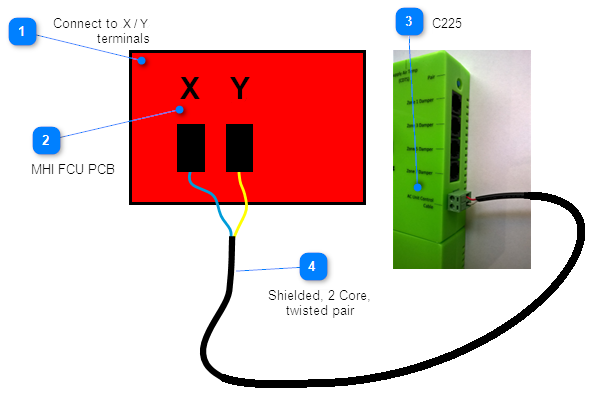
Notes
- Master/Slave options are not available on iZone systems for MHI units.
- Both OEM and iZone controllers cannot be wired into the indoor FCU board simultaneously.
- Please be advised you may need to increase the static pressure when installing MHI with iZONE.
Static Pressure Setup
- Before installing iZone:
- Connect the MHI controller first.
- Enter the password on the MHI controller:
9999
- Navigate to:
- Installation Setup
- Static Pressure
- Factory settings are typically between 80 Pa and 100 Pa.
- This setting may cause:
- Outdoor unit not to fully cycle.
- Coil not to operate correctly.
- Adjust static pressure to 160 Pa.
- Run the unit for 5 minutes.
- Disconnect the controller and install iZone.
Firmware and Updates
C325MHI2
C325MHI2 2.5 - May 2024
- First release
C325MHI3
C325MHI3 1.0 - Jul 2026
- Initial Release - Added VRF control support.