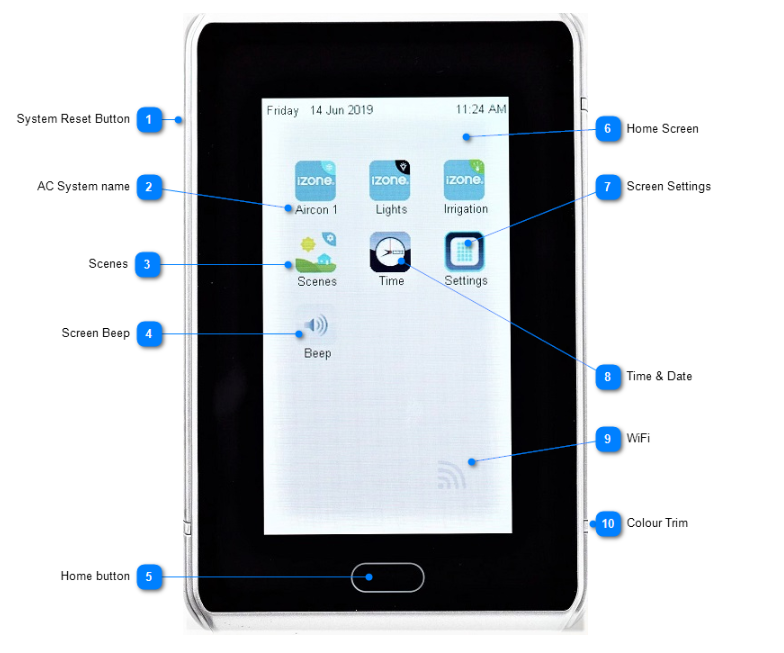
System Reset Button: The iZone system reset button is located on the side or bottom of the screen depending on screen orientation
AC System Name: The AC system name is generated automatically by the system. Additional systems displayed on the same screen will have sequential numbers, e.g. 1, 2, 3... Tap on the icon to access this AC system
Scenes: Tap here to access the scenes set up
This is only useful when you have other iZone automation products that you want to control and schedule with the AC system
Screen Beep: Press here to turn the screen beep on / off
Home Button: Press the Home Button 1-2 times to return to this Home screen
Home Screen: Typical Classic style home screen
Screen Settings: Tap here to change the screen settings including: Background Colour, Brightness, Contrast, Saturation, Graphic Style, Screen Orientation, Child Lock, Hide other services
Time & Date: Tap here to change the date and time
Wi-Fi: If a Wi-Fi bridge is paired it will display a grey symbol as shown
The symbol will turn green when it is connected to a Wi-Fi modem
Colour Trim: Screens are supplied with different colour trim. Remove the trim supplied and replace it with the colour you prefer